> ## Documentation Index
> Fetch the complete documentation index at: https://coinstats.app/docs/llms.txt
> Use this file to discover all available pages before exploring further.
# ConnectKit Tutorial
> Create a ConnectKit flow and open the hosted CoinStats connection popup from your app.
export const title_0 = "Need Help?"
export const cards_0 = "true"
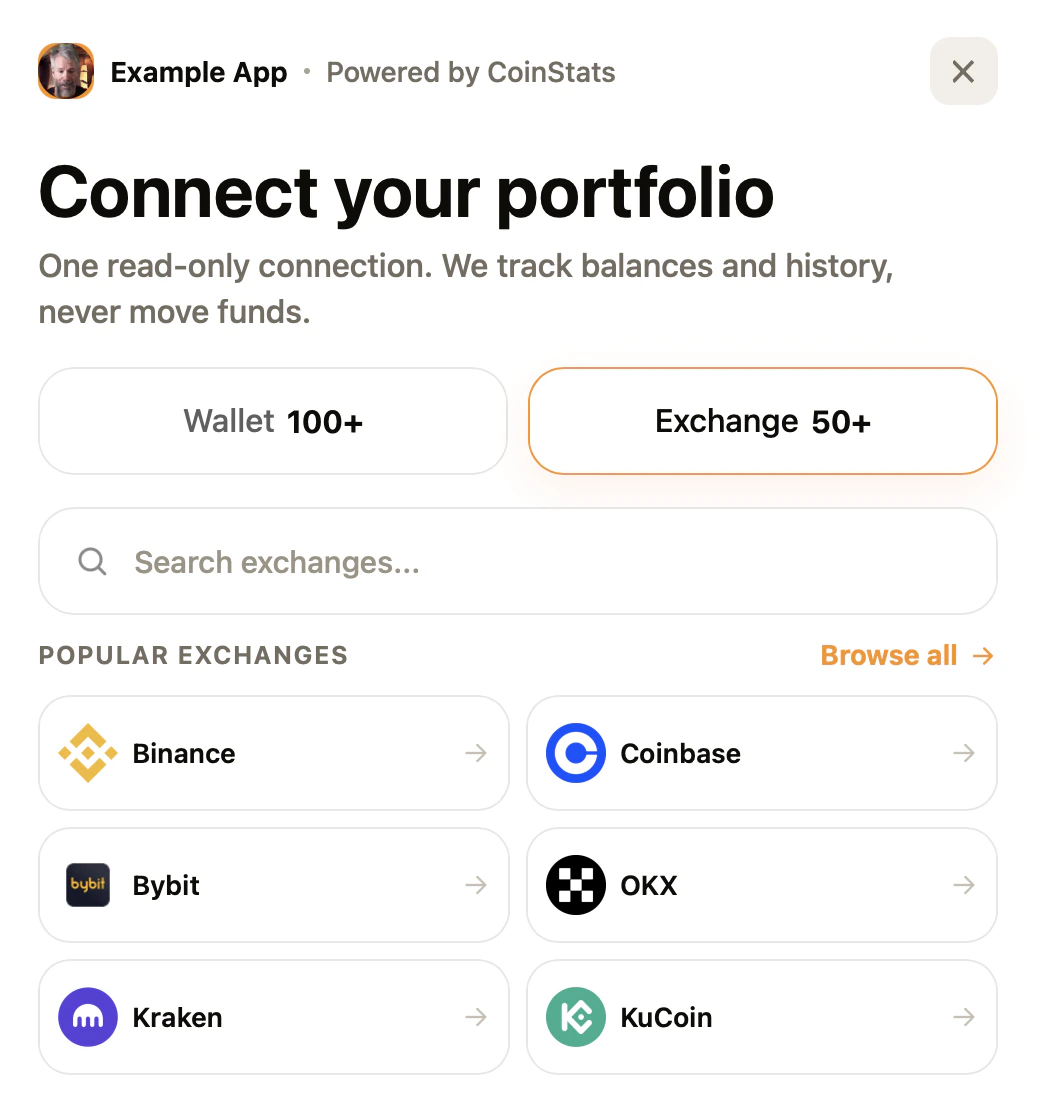 ConnectKit lets your app send users into a branded CoinStats-hosted popup to connect wallets or exchanges. Your API key stays on CoinStats servers. Your frontend only uses the public ConnectKit ID, redirect URL, and your own `state` value.
## What value this gives
* Add wallet and exchange connection to your product without building exchange credential forms yourself.
* Keep API keys out of browser code. The ConnectKit ID is public; the API key remains server-side.
* Receive a `portfolioId`, `connectionId`, and your original `state` when the connection finishes.
* Control which domains can open ConnectKit with allowed origins and redirect URLs.
## Example values
Use values like these while testing the flow:
| Field | Example value | Where it is used |
| -------------- | -------------------------------------------- | ---------------------------------------------------- |
| Name | `Example App Portfolio` | Internal dashboard name |
| Company name | `Example App` | Displayed inside the hosted popup |
| Allowed origin | `https://app.example.com` | The browser origin allowed to open ConnectKit |
| Redirect URL | `https://app.example.com/coinstats/callback` | Where CoinStats sends the user after connection |
| ConnectKit ID | `pcw_3d349bd92f0c99a219` | Public ID used by your frontend |
| State | `user_12345` | Your user/session reference returned with the result |
## Set up ConnectKit
Go to the [API dashboard](https://openapi.coinstats.app/connect-kits), open **ConnectKit**, and click **Add**.
Fill in the fields that define where ConnectKit can run and how it appears to users:
* **Company logo**: Upload the logo shown in the hosted connection popup.
* **Name**: Add an internal name for this setup, such as `test` or `prod_app`.
* **Company name**: Add the app or brand name users will see, such as `Example App`.
* **Allowed origins**: Add every browser origin allowed to open ConnectKit.
* **Redirect URLs**: Add the exact callback URLs CoinStats can return to after connection, one per environment.
* **Config**: Choose the default mode, appearance, and accent color if you want defaults different from the SDK call.
ConnectKit lets your app send users into a branded CoinStats-hosted popup to connect wallets or exchanges. Your API key stays on CoinStats servers. Your frontend only uses the public ConnectKit ID, redirect URL, and your own `state` value.
## What value this gives
* Add wallet and exchange connection to your product without building exchange credential forms yourself.
* Keep API keys out of browser code. The ConnectKit ID is public; the API key remains server-side.
* Receive a `portfolioId`, `connectionId`, and your original `state` when the connection finishes.
* Control which domains can open ConnectKit with allowed origins and redirect URLs.
## Example values
Use values like these while testing the flow:
| Field | Example value | Where it is used |
| -------------- | -------------------------------------------- | ---------------------------------------------------- |
| Name | `Example App Portfolio` | Internal dashboard name |
| Company name | `Example App` | Displayed inside the hosted popup |
| Allowed origin | `https://app.example.com` | The browser origin allowed to open ConnectKit |
| Redirect URL | `https://app.example.com/coinstats/callback` | Where CoinStats sends the user after connection |
| ConnectKit ID | `pcw_3d349bd92f0c99a219` | Public ID used by your frontend |
| State | `user_12345` | Your user/session reference returned with the result |
## Set up ConnectKit
Go to the [API dashboard](https://openapi.coinstats.app/connect-kits), open **ConnectKit**, and click **Add**.
Fill in the fields that define where ConnectKit can run and how it appears to users:
* **Company logo**: Upload the logo shown in the hosted connection popup.
* **Name**: Add an internal name for this setup, such as `test` or `prod_app`.
* **Company name**: Add the app or brand name users will see, such as `Example App`.
* **Allowed origins**: Add every browser origin allowed to open ConnectKit.
* **Redirect URLs**: Add the exact callback URLs CoinStats can return to after connection, one per environment.
* **Config**: Choose the default mode, appearance, and accent color if you want defaults different from the SDK call.
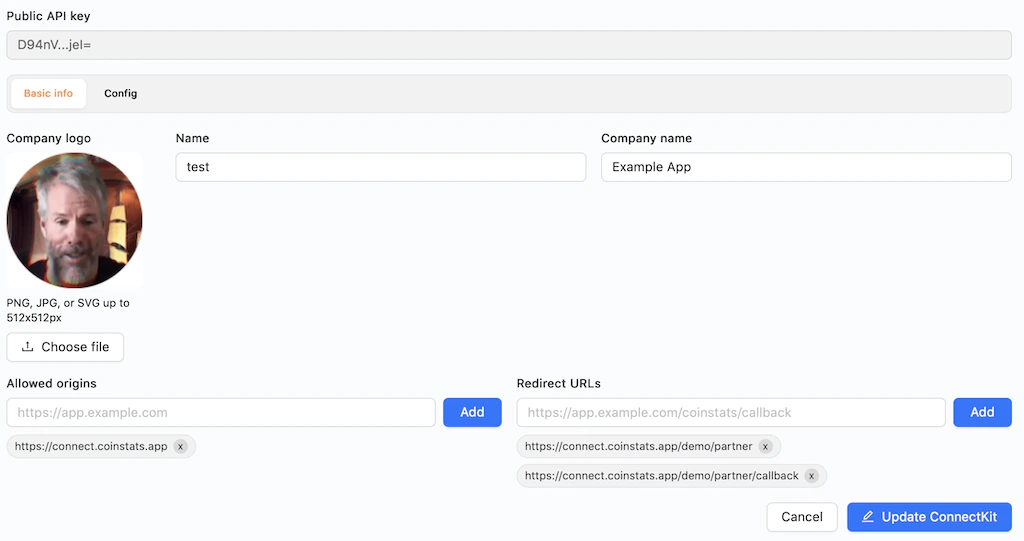 After saving, copy the ID from the list. This ID is safe to use in browser code.
 Use the npm package or hosted script to open the popup from your app. The popup runs on `connect.coinstats.app`.
## NPM integration
Install the SDK:
```bash theme={null}
npm install @coinstats/connectkit
```
Open the popup from browser code:
```ts theme={null}
import { openCoinStatsConnect } from '@coinstats/connectkit';
openCoinStatsConnect({
id: 'pcw_3d349bd92f0c99a219',
redirectUri: 'https://app.example.com/coinstats/callback',
state: 'user_12345',
mode: 'both',
appearance: 'light',
accentColor: '#F7931A',
onSuccess(result) {
console.log('Connected portfolio', result.portfolioId);
},
onError(error) {
console.error(error.message);
},
onClose() {
console.log('User closed the popup');
},
});
```
## Script tag integration
For plain HTML pages, load the hosted browser bundle:
```html theme={null}
```
## Handle the result
When the user finishes, match the returned `state` with the user or session that started the flow. Store the returned `portfolioId` or `connectionId` on your side.
Example redirect:
```http theme={null}
GET /coinstats/callback
?status=success
&portfolioId=portfolio_abc123
&connectionId=binance
&state=user_12345
```
Example popup callback result:
```json theme={null}
{
"status": "success",
"portfolioId": "portfolio_abc123",
"connectionId": "binance",
"state": "user_12345"
}
```
## Before going live
* Add every production origin that can open the popup.
* Use HTTPS redirect URLs in production.
* Generate and keep the API key in the CoinStats API dashboard.
* Store the returned portfolio or connection ID with your user.
* Keep API keys server-side. The frontend only needs the ConnectKit ID.
## {title_0 || "Support"}
{cards_0 ? (
Check our comprehensive help center
Join our API support channel for real-time help
You can reach us directly at api.support@coinstats.app
) : (
Use the npm package or hosted script to open the popup from your app. The popup runs on `connect.coinstats.app`.
## NPM integration
Install the SDK:
```bash theme={null}
npm install @coinstats/connectkit
```
Open the popup from browser code:
```ts theme={null}
import { openCoinStatsConnect } from '@coinstats/connectkit';
openCoinStatsConnect({
id: 'pcw_3d349bd92f0c99a219',
redirectUri: 'https://app.example.com/coinstats/callback',
state: 'user_12345',
mode: 'both',
appearance: 'light',
accentColor: '#F7931A',
onSuccess(result) {
console.log('Connected portfolio', result.portfolioId);
},
onError(error) {
console.error(error.message);
},
onClose() {
console.log('User closed the popup');
},
});
```
## Script tag integration
For plain HTML pages, load the hosted browser bundle:
```html theme={null}
```
## Handle the result
When the user finishes, match the returned `state` with the user or session that started the flow. Store the returned `portfolioId` or `connectionId` on your side.
Example redirect:
```http theme={null}
GET /coinstats/callback
?status=success
&portfolioId=portfolio_abc123
&connectionId=binance
&state=user_12345
```
Example popup callback result:
```json theme={null}
{
"status": "success",
"portfolioId": "portfolio_abc123",
"connectionId": "binance",
"state": "user_12345"
}
```
## Before going live
* Add every production origin that can open the popup.
* Use HTTPS redirect URLs in production.
* Generate and keep the API key in the CoinStats API dashboard.
* Store the returned portfolio or connection ID with your user.
* Keep API keys server-side. The frontend only needs the ConnectKit ID.
## {title_0 || "Support"}
{cards_0 ? (
Check our comprehensive help center
Join our API support channel for real-time help
You can reach us directly at api.support@coinstats.app
) : (
- Documentation: This site contains comprehensive API documentation
- Telegram Chat: For quick help and to connect with other developers, join our API Support Telegram group
- Email Support: You can reach us directly at api.support@coinstats.app for personalized assistance.
)}